Tampilkan postingan dengan label Tools/Softwares. Tampilkan semua postingan

Kamis, 30 Juni 2016

How To Hack WhatsApp Using SS7 Flaw


Researchers are easily able to hack WhatsApp and Telegram using the known telecom flaw


We continuously receive queries from readers about how to hack WhatsApp. The world’s most popular cross platform messaging App is seen to be ultimate hack by many because it has recently enabled 256-bit encryption.

For ordinary souls this encryption would take days and months to decode a sentence or a complete message. Ditto with another secure messaging service called Telegram. Though Telegram is not as popular as WhatsApp, it has its ardent group of followers who use it for its encryption as well as snooping free service.

Though both of these Apps are end-to-end encrypted both of them suffer from hardware side vulnerability which can be exploited to hack and hijack both WhatsApp and Telegram.

The vulnerability lies in Signalling System 7, or SS7, the technology used by telecom operators, on which the highly secure messaging system and telephone calls rely. SS7 is a set of telephony signalling protocols developed in 1975, which is used to set up and tear down most of the world’s public switched telephone network (PSTN) telephone calls. It also performs number translation, local number portability, prepaid billing, Short Message Service (SMS), and other mass market services.

SS7 is vulnerable to hacking and this has been known since 2008. In 2014, the media reported a protocol vulnerability of SS7 by which both government agencies and non-state actors can track the movements of cell phone users from virtually anywhere in the world with a success rate of approximately 70%. In addition, eavesdropping is possible by using the protocol to forward calls and also facilitate decryption by requesting that each caller’s carrier release a temporary encryption key to unlock the communication after it has been recorded. Researchers created a tool (SnoopSnitch) which can warn when certain SS7 attacks occur against a phone and detect IMSI-catchers.

You can view how researchers managed to hack WhatsApp and Telegram using the SS7 flaw below:

WhatsApp Hack


Telegram Hack


Both the hacks exploit the SS7 vulnerability by tricking the telecom network into believing the attacker’s phone has the same number as the victim’s phone. Once the network has been fooled, anybody, even a newbie can spy on the legitimate WhatsApp and Telegram user by creating a new WhatsApp or Telegram account using the secret code.

Once complete, the attacker now controls the account, including the ability to send and receive messages. Even more horrific is the fact that the hacker can also send messages on behalf of the victim, and read confidential messages intended for the victim without ever having to try to break strong encryption protocols.

See how easily you can hack WhatsApp and Telegram by fooling the network into believing your are the victim.
Source: http://www.techworm.net/2016/06/how-to-hack-whatsapp-using-ss7-flaw.html

Selasa, 21 Juni 2016

Hackers Show How To Hack Anyone’s Facebook Account Just By Knowing Phone Number


Short: By exploiting the SS7 flaw, a hacker can hack someone’s Facebook account just by knowing the associated phone number. This flaw allows a hacker to divert the OTP code to his/her own phone and use it to access the victim’s Facebook account. The security researchers, who have explained the hack in a video, advise the users to avoid adding their phone numbers to the public services.

Facebook hacking is also one of the most commonly searched terms on the internet. However, very often people become a victim of malware while searching for Facebook hacking tools.

As we continue to deploy new safety measures to secure our online accounts, hackers and security researchers continue to find new ways to control Facebook accounts.

Recently, we told you how an Indian security researcher spotted a bug in the Facebook website and got $15,000 bug bounty.

Today, we are going to tell you how hackers can hack any Facebook account just by knowing the associated phone number and exploiting an issue with SS7 network.

For those who don’t know, SS7 network (Signalling System Number 7) is a communication protocol that’s used worldwide by the cellphone carriers.

Using a flaw in SS7, hackers can divert the text messages and calls to their own devices. This hacking technique has been shared as a proof-of-concept video by the security researchers from Positive Technologies.

How To Facebook Account By Knowing Phone Number (Video):

This flaw affects all Facebook users who have associated a phone number with their Facebook accounts.


In the demonstration video, the security researchers show that as the first step of the hack, the attacker needs to click on the “Forgot account?” button on Facebook.com website’s homepage.

When Facebook prompts the hacker to enter an email address or phone number, he/she should enter the correct number associated with the account.

By exploiting the SS7 flaw, the hacker is able to divert the OTP message from Facebook to his/her own computer and use it to login to the victim’s Facebook.

The researchers list some measures that a user can take to secure his/her Facebook account. They advise people to avoid adding their phone numbers to public services and rely on email for recovery purposes.

The users are also advised to use 2-factor authentication methods that don’t use SMS texts for sending OTP.
Source: http://fossbytes.com/facebook-hack-using-phone-number-ss7-flaw/

Selasa, 31 Mei 2016

How To Unlock Windows/Mac Computer From Android/iOS


One of the interesting tutorials which will help users to lock or unlock their computer by using their smartphone, if you are the owner of any Windows, Mac, Android and iPhone then this tutorial is definitely for you, just understand the steps below.

Before we start we should explain that what is the circumstances using this tutorial, this trick tutorial is only created to make a full system secure. But really? Read Below!

Note: TO MAKE YOU AWARE, you are required to install third party software in this tutorial, on computer as well as on your smartphone, whenever your computer is locked by mistake using ATL+L and you don’t know your password, you can unlock it by restarting your computer by key press of F8 which is a Safe Mode and from that windows you can do alteration to your computer.

Still want to do some prank with friends locking your computer just by using your smartphone then why are you waiting for? just start from the below steps.

First In First Out! Ever Heard of this?
Things required to perform this trick!


Download Rohos For Your Windows
Download Rohos For Your Mac OS
Download Rohos For Your Android
Download Rohos For Your iPhone

Select Option And Setup a Key

Step1. From Computer, Download and install Rohos, Open it, Select Options, from Options, select all the three option Firstly select Mobile Phone, Secondly select Lock Computer, Thirdly select For Any User. All done just click on OK.
Select as Showing

Step2. Now select setup a Key. Enter your desired password, soon after you put password you will see a QR Code, and that QR Code you need to scan it from your smartphone using that application as mention to the top of the steps.

Enter a New Password And Scan The QR Code From your Smartphone Rohos Application

Note: Once you connected your mobile with a computer application Rohos, then from the next time you can use your mobile to lock or unlock your computer, TO UNLOCK YOUR COMPUTER YOU DON’T NEED TO TYPE ANY USER NAME OR PASSWORD, JUST USE YOUR SMARTPHONE.

Step3. Maybe to scan the QR code the Android application will ask you to download a new QR code scanner from Google play store and for that, you need to download that scanner too. Make sure to turn your WiFi/Bluetooth to connect your computer, and as soon as you scan your QR code from your computer your smartphone will be connected with your computer and you can use only your smartphone to Lock or Unlock your computer.

All done, just make sure that your computer and the phone must be connected to the same WiFi/LAN network in order to connect with each other.

You need to test it and for that just press Win+L key (Windows Button + L), in which your computer will be locked and open your mobile application and unlock your computer.

Hope you understood this tricky method, if you have any question you can ask by using the below Contact box.
Source: https://codingsec.net/2016/05/unlock-windows-mac-computer-from-android-ios/

Sabtu, 28 Mei 2016

Google’s VirusTotal Can Now Scan Your Firmware For Infection

Short: Google is in the process of adding a new anti-malware detection program in its online malware detection tool VirusTotal. It will be used for scanning BIOS for the legitimate programs installed on it. VirusTotal will also use machine learning to learn from the program behavior and hence finding out the malware.

Latest National Security Agency revelations by Snowden involves many secrets regarding the projects involving infecting BIOS firmware. Apart from the NSA, there are more examples of attempts to inject malware into the firmware of the computer.
Until now, the Antivirus industry has not made anything to detect the malware in the BIOS. BIOS is loaded into memory at the beginning of the boot process. That’s why the main operating system code resides on a memory chip soldered onto the mainboard. Thus, BIOS becomes one of the most targeted virus attacks as the code is loaded into the machine before the startup of the operating system.

This makes a malware residing on the firmware almost impregnable and virtually impossible to detect. They can survive system reboots, system wiping and reinstallations of the operating systems. Until now the firmware malware has been ignored a lot in the Antivirus industry but, Google’s VirusTotal may well change this.

VirusTotal will categorize the BIOS into either a legitimate or a malicious BIOS image. VirusTotal can scan all the operating systems including Windows and Apple Mac BIOS to obtain relevant information about the code on the Flash tool. It uses heuristic detection which is based on machine learning to identify the suspect code as well as looking up for the legitimate executable applications built into the BIOS.

Sometimes, the BIOS manufacturers put a computer legitimate program like computer trace programs. These programs help an owner of the machine to trace the computer in case of lost. VirusTotal will extract these executable files and submits them to the service. It will also enable a user to look into the details of the legitimate executable programs.
— VirusTotal Blog
Source: http://fossbytes.com/googles-virustotal-can-now-scan-firmware-infection/

Kamis, 07 April 2016

How To Dual Boot Kali Linux With Windows 10. A Step-By-Step Tutorial

Kali Linux is the most famous Linux distribution for hackers and penetration testers. If you want to start your carrear as a hacker or a pen tester, our website provides you with all the right information you need. The starting point of being a hacker is good knowledge using Kali. So, in this article let us see how to dual boot Kali Linux with windows 10.

Basic Requirements

  • A laptop/ PC
  • A Pendrive with minimum 8 GB storage space
  • Windows 10 or any other version of Windows pre installed
  • Kali Linux v2.0 which you can get here
  • PowerISO which you can get here

Step -1

First we have to download the latest version of the Kali Linux for official website, the link to which is here. You can choose either a 32 bit or a 64 bit version based on your computer. Better download the file with over 3 GB size which comes with some pre installed tools.

Step -2

After downloading Kali, we have to make a bootable USB drive by downloading PowerISO. The link is given above, yo have to download it and install.

Step -3

Now, run the installed PowerISO as administrator.

In PowerISO, goto ” Tools → Create Bootable USB Drive ”


Step -4

Now select the Source Image File and provide it with the downloaded kali file location.


Step -5

In another tab Destination USB Drive.Choose your USB drive/Pendrive.

And select Write Method as “Write RAW Image File to USB Drive“.

Finally hit ” Start ” button below.

wait till the process to complete.


Step -6

Next step is to create a separate partition for Kali Linux installation.For this, open your Disk Management settings in Windows or just type ” diskmgmt.msc ” command in Run.

Create a new partition of size about 15 – 25GB minimum by shrinking any existing volume.If you choose to use Kali often then you an give it more than 50 GB of storage.For demonstration sake we created a new partition of size 17GB.


Step -7


We are done with all the initial processes. now restart your PC and enter bios by pressing F2 key or Esc key baed on your computer model. Select Boot as USB option. Now an image similar to the one below appears, click on Graphical install .

Step -8

In the next page select your preferred language.


Step -9

In this page select your country and click continue to installation process.


Step -10

Now choose your key board style. Choose American English for normal key board style.


Step -11

In this step we have to set IP configurations.You can Configure your network Automatically or Manually.


Step -12

In this page you will be asked for a Hostname. Set any name of your own choice.


Step -13

In this step you have to enter a password for ” ROOT User “. After entering Administrative account password click ” Continue “.


Step -14

Choose partitioning method in the next page as ” Manual ” and hit ” Continue “.


Step -15

This step has to be done carefully. Only select the partition that we created for Kali installation and press ” Continue“.


Step -16

Then select the option ” Delete the partition ” and hit ” Continue “.


Step -17

Now you can see that space we allocated for Kali installation is now named as ” FREE SPACE“. Choose it and ” Continue “.


Step -18

In this step it will ask us where to do the partition. Choose the option ” Automatically partition the free space ” and ” Continue ” the process.


Step -19

In this step you will be asked the partition scheme just select All files in one partition and click “continue”


Step -20

Finally select the option ” Finish Partitioning and Write Changes to Disk ” and ” Continue “.


Step -21

In this step it will ask permission to write changes in disk.Choose ” Yes ” and ” Continue “.

Kali is installing and this might take from 10 to 15 minutes to complete.


Step-22

In the middle of installation it will ask for network mirroring, choose ” Yes ” or ” No “. We recommended you to choose ” No “.

Step -23

In the next step, it will ask for installing GRUB boot loader, choose ” Yes “.and ” Continue “.


Step -24

Next in this page you have to select where to install boot loader. Choose your hard disk which is the second option.


Step -25

After successful completion of installation process, A page similar to the one seen below appears . Click ” continue “.


Step -26

You have completed all the necessary steps. Now just Restart your PC/Laptop and remove the USB drive.

During StartUp you can see the GRUB Loader of Kali Linux v2.0.

Here choose ” Kali GNU/Linux ” to boot your PC/Laptop with the new Kali Linux

or else choose ” Windows Recovery Environment ” to start as Windows 10.


Congrats you successfully dual boot Kali Linux with Windows. Now start hacking like a pro following our tutorials and make a future in cyber security field.

If you face any difficulties, comment below.

Minggu, 28 Februari 2016

How to Crack WinRAR Password Protected Files In Simple Steps


Short: Losing/forgetting your WinRAR password could be a headache. So, here, I’m going to tell you this simple method of how to crack WinRAR password protected files. Take a look.

WinRAR is a great utility to compress your files and protect it using a password. You can keep your data safe and save storage space by keeping it compressed in .RAR format. However, what to do if you forget the password of your WinRAR password protected file?

To crack WinRAR password protected file password, you need to recover the WinRAR file password and use it to unlock the file. There are some methods to crack WinRAR password using the command prompt, but they just work on integers and other combinations of characters.

So, all you need is a 100% working method that cracks the WinRAR password. In this detailed tutorial, we’ll be using a simple password recovery tool to recover your lost/forgotten WinRAR file passwords.

You need to use the .RAR Password Genius to crack WinRAR password and .ZIP Password Genius to crack the WinZIP Password.

In the steps described ahead, I’ll describe how to crack WinRAR password. WinRAR Password Genius is a tiny but powerful password recovery tool that is famous for high speed and guessing the complex password algorithms. It supports all the software that create the .RAR archives.

Let’s get started:
  1. To crack the WinRAR passwords, you need to download the WinRAR Password Genius from this link and install it on your PC. This software is the solution to all your worries and it works in three steps to complete the WinRAR password recovery.
  2. To start WinRAR recovery process, you need to fire-up the software and import the .RAR file into the WinRAR Password Genius. You can do this by hitting the Open button and look for the .RAR file on your computer to bring it in the Encrypted File box.
  3. The software uses multiple attack techniques to crack the WinRAR password. Different kinds of attacks are Brute-force, Mask, Dictionary and Smart. These are used to guess different types of passwords and you need to use these methods accordingly. Read more about these here to select the type and settings.
  4. Now after choosing the Type of attack from the drop-down list, select the attack type and crack WinRAR password by pressing the Start button.
  5. After this, the software will start its process and recover the WinRAR password for you. As the software cracks the file, a pop-up will appear showing you the password.
  6. Now, open the password protected .RAR file in WinRAR and you’ll see a dialog that asks for the password. Now, enter the recovered password and hit enter. This will bypass the password and now you can access your files and extract them.
To crack the WinZIP password protected files, you need to use the WinZIP Password Genius.

Source: http://fossbytes.com/how-to-crack-winrar-password-protected-files-in-simple-steps/

Selasa, 09 Februari 2016

Here's the Facebook Hacking Tool that Can Really Hack Accounts, But...


Yes, you heard me right.

A newly discovered Facebook hacking tool actually has the capability to hack Facebook account, but YOURS, and not the one you desires to hack.

How to Hack Facebook account? How to Hack my Girlfriends Facebook account? My boyfriend is cheating on me, How do I hack his Facebook Account?

These are the queries that most of the Internet users search on Google.


But Beware! If you come across any Facebook hacking tool that promises you to help you hack your friends Facebook accounts, you may end up downloading a hacking tool that could hack you, instead of them.

Facebook Hacking Tool that Can Really Hack, But Your Accounts


Dubbed Remtasu, the tool is marketing itself as a Facebook hacking tool but actually is a Windows-based Trojan that has accelerated globally over the past year, and has now capability to disguise itself as an app for accessing people's Facebook account credentials.

The tool contains a Keylogger that can capture all your keystrokes and store them in a file that is subsequently sent to the attacker's server.

The malicious Facebook hacking tool is exploiting "the constant desire of a lot of users to take control of accounts from this well-known social network," according to a Monday blog post by IT security company ESET.

How Remtasu Works:


The malicious tool is delivered via direct download websites.

Once a user visits one of these websites, the dangerous Win32/Remtasu.Y malware automatically gets downloaded and executed on victim's machine and hide itself among other files.


Remtasu has capability to:
  • Open and obtain information from the clipboard.
  • Capture keystrokes.
  • Store all the data in a file which is subsequently sent to an FTP server.

The worst part is yet to come:

The malware remains on the infected computer even when the victim reboots their system or attempts to find the malware threat in the list of active processes.
"In this case, the malware replicates itself, saving the copy in a folder that it also creates within the system32 folder," reads the post. "The new InstallDir folder remains hidden inside the system files, making it difficult for users to access."
Most affected parts of the world include Colombia, Turkey, Thailand and elsewhere. In past, Remtasu was distributed through malicious files attached to phishing emails purporting to be from legitimate government or businesses organisations.

Senin, 18 Januari 2016

WhatsApp is Now Free For Lifetime


Good News for WhatsApp users!

The widely popular messaging service is going completely free. And you'll be able to use WhatsApp without paying a penny.

Old WhatsApp users might not be aware of this, but WhatsApp introduced the subscription fees for its service a few years ago, forcing new users to pay an annual 99 cents (~$1) subscription fee after the first year.

However, WhatsApp announced Monday that the Facebook-owned company is dropping its annual subscription fee to make its service free to all users.

While announcing the plan today, WhatsApp's founder Jan Koum stated that the annual subscription fee was still a barrier to some users.
As we have grown, we have found that this approach has not worked well," WhatsApp admitted in a company blog post today. "Many WhatsApp users do not have a debit or credit card number, and they worried they'd lose access to their friends and family after their first year.

What will be WhatsApp's New Business Model?

WhatsApp categorically said the company won't be replacing the subscription fee with third-party advertisements like intrusive banner and interstitials, which nowadays is a common practice used to make free applications profitable.

Instead, the company said it will explore ways businesses can use WhatsApp to connect with individuals, and will introduce new ways for users to communicate with businesses and organisations that will pay the company to target relevant communications with customers.

For example:

  • A bank could use WhatsApp paid account to communicate with its customers about recent transactions and necessary fraud warnings.
  • An airline could use WhatsApp paid account to contact its passengers about a delayed schedule or cancelled flight.
It is the same approach WhatsApp parent company Facebook is using with its own Messenger application, which in last month started allowing its users to book an Uber cab directly through the Messenger app.

Minggu, 29 November 2015

How To Recover Data From An SD Card Or Hard Drive


Are you worried about the files which are deleted ? If yes then don’t worry since there are lot of softwares and tools to recover deleted files from your disk but few works and few might not. Here is the best software that we suggest you to recover your deleted files from your disk. This software have free version and paid version too, its better you go with free version. Using free version we can recover almost all the files which have been deleted or corrupted or formated accidentally.


File Name :- Recuva
File Size :- 4.5 MB
System Requirements :- Windows 8.1, 8, 7, Vista and XP.
Download Link :- Click Here (Link will open in a new tab)

Kamis, 15 Oktober 2015

Website Hacking With DNS Hijacking Urdu Tutorial

Website Hacking With DNS Hijacking


Jumat, 25 September 2015

Parrot Security OS – Debian Based Security Oriented Operating System


Parrot Security OS for Pentesting, Computer Forensic, Reverse engineering, Hacking, Cloud pentesting, Privacy/Anonimity and Cryptography

Parrot security OS is an open source distribution of Linux based on the well known and award winning Debian GNU/Linux operating system. As its developers describe, it is a masterpiece that gathers together all the necessary tools for hacking, penetration testing, security and privacy tasks.

According to its developers, Parrot Security OS is a security oriented operating system designed for Penetration Testing, Computer Forensic, Reverse engineering, Hacking, Privacy/Anonymity and Cryptography.


Instead of installing the OS then painstakingly assembling your collection of security tools (and package dependencies), using something like Parrot Security OS takes care of all that for you

It is based on Debian and developed by Frozenbox network. Parrot is designed for everyone, from the Pro pen-tester to the newbie, because it provides the most professional tools combined in a easy to use, fast and lightweight pen-testing environment, and it can be used also for an everyday use.

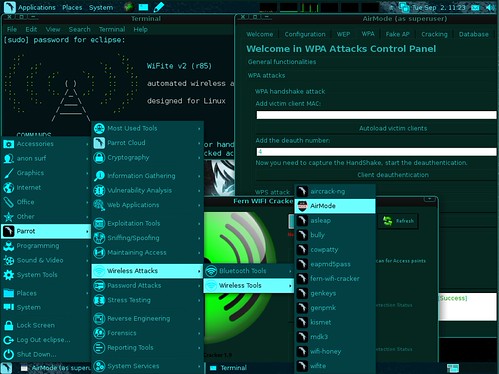
Most of the penetration testing tools can be found under the Parrot entry of the main menu, where they’re organized in subsections. In addition, an anonymous surfing mode is available for those who don’t want to be traced.

Among the included applications, we can mention TrueCrypt, Ettercap, Iceweasel, Vidalia, Wireshark, VLC Media Player, RecordMyDesktop, BleachBit, XRCed, PyCrust, aircrack-ng, Hydra, Nmap, and many others.

Features

  • Updated pen-testing tools
  • Great for forensic analysis
  • Custom hardened 3.16 kernel
  • MATE interface with custom themes, wallpapers and icons
  • Fast lightweight system designed also for old computers
  • PenMode + AirMode
  • AnonSurf functionality (tor & i2p)
  • Pandora’s box ram cleaner at shutdown
  • Encrypted installation
  • Cryptocurrency friendly
  • All the necessary for programming out of the box
  • Cloud compatible

Rather than downloading the whole ISO, there’s also a BASH script version which turns a regular Debian Stable install into Parrot Security OS, you can find the script here:

parrot-install.sh

You can download Parrot Security OS here:

amd64 Parrot Full – Parrot-full-1.9_amd64.iso
i386 Parrot Full – Parrot-1.9_i386.iso

Or read more here.

Kamis, 17 September 2015

BackTrack 5 R3 Downloads


BackTrack 5 R3 Downloads


ISO Images                                                                     Size

BackTrack 5 R3 GNOME 32 Bit            Download          1.9GB

BackTrack 5 R3 GNOME 64 Bit            Download          3.1GB

BackTrack 5 R3 KDE 32 Bit                  Download          3.1GB

BackTrack 5 R3 KDE 64 Bit                  Download           3.1GB


BackTrack 5 R3 VMware Images


BackTrack 5 R3 GNOME VM-32.7z Download

BlackArch Linux Downloads


BlackArch Linux Downloads

Images                                       Direct             Size

BlackArch Linux 64 bit                ISO               4.4GB

BlackArch Linux 64 bit                ISO               4.1GB


Rabu, 16 September 2015

Kali Linux Download


Kali Linux Download


Image Name                          Direct            Torrent              Size                 Version

Kali Linux 64 bit                      ISO                Torrent               3.1G                2.0

Kali Linux 32 bit                      ISO                Torrent               3.2G                2.0

Kali Linux 64 Bit                     ISO                Torrent               2.8G                1.1.0

Kali Linux 32 Bit                     ISO                Torrent               2.9G                1.1.0


Kali Linux VmWare and VirtualBox Images


Kali Linux 2.0 Vmware (VMDK) 64bit Download

Selasa, 12 Mei 2015

FolderMage Pro (Registered Version)


FolderMage Pro is a straight forward application designed to enable you
to password protect all the private or sensitive information on your hard drive(s)
and external devices.
You can make your files and folders inaccessible, invisible,
protect them from modification
and deletion, restrict execution from them.

The protected data is not accessible by any users or applications -
no matter how they are trying to get in - locally or from the net.
Intuitive user interface of FolderMage Pro will suit the needs of everyone -
from novice Windows users to computer experts.
The amount of files/folders on computer, that you can protect with FolderMage Pro, is unlimited.Here are some key features of "FolderMage Pro":
  • Effectivness of files protection allow you to hide folders out from users, applications and malicious software in Windows XP, Server 2003, Vista, Server 2008 and Windows 7. Only the owner of application's master password will access your hidden folders.
  • 5 protection methods available: Hide, Lock, Hide & Lock, Read Only, Deny ExecutionTrue Stealth mode: install once - use everywhere!
  • Ability to select file types, which will be protected.
  • Volumes of all file systems are supported.
  • File Shredder included - no chance for unneeded data to remain on hard drive.
  • The number of protected files/folders is unlimited.
  • No file system structure modifications are made while using FolderMage Pro.
  • Usage and uninstallation of FolderMage Pro is protected with single password.
  • Protection is active in Safe Mode as well.
  • Support for folders named with national language symbols.
  • 32 Bit support

Acunetix Web Vulnerability 9 Full Version Free Download


Acunetix Web Vulnerability Scanner 9 Website security is apparently today's most unnoted side of securing the endeavor and will be a necessity in any association. Programmers ar focusing their endeavors on online provisions - looking trucks, structures, login pages, element content, and so on net requisitions ar approachable twenty four hours day by day, seven days for every week and administration important information since they normally have immediate access to backend learning like customer databases. Firewalls, SSL and bolted down servers ar purposeless against net requisition hacking Any barrier at system security level can give no assurance against net provision strike since they're started on port eighty - that may as well stay open. furthermore, net provisions ar regularly bespoken in this way tried however primed to-wear programming bundle and ar a considerable measure of apparently to claim undiscovered vulnerabilities. Acunetix net Vulnerability Scanner 9 mechanically checks your net provisions for SQL Injection, XSS & distinctive net vulnerabilities.
Review your data transforming framework security with Acunetix net Vulnerability Scanner 9 Scanner

In the event that net provisions don't appear to be secure, then your whole data of delicate illumination is at genuine risk> so Why?

• Websites and joined net provisions ought to be receptive twenty four x seven to supply the fancied administration to clients, representatives, suppliers and distinctive stakeholders

• Firewalls and SSL give no assurance against net provision hacking, simply in light of the fact that right to gain entrance to the site ought to be made open

• net provisions regularly have immediate access to backend learning like customer databases and, subsequently, administration profitable information and ar much more intense to secure

• Custom provisions ar a great deal of subject to strike as a consequence of they include a lesser level of testing than primed to-wear programming bundle

• Hackers like picking up access to the delicate learning on account of the unfathomable pay-offs in promoting the information.

In profundity checking for SQL Injection, Cross site Scripting (XSS) and diverse Vulnerabilities

Acunetix checks for all net vulnerabilities together with SQL infusion, Cross site scripting et al. SQL infusion could be a hacking system that adjusts SQL charges in order to acknowledge access to learning inside the data. Cross site scripting assaults allow a programmer to execute a vindictive script on your visitor’s browser.

Recognition of the aforementioned vulnerabilities needs a tasteful discovery motor. prevalent to net helplessness filtering isn't the amount of assaults that a scanner will find, however the quality and reliability with the scanner launches SQL infusion, Cross site scripting and diverse strike. Acunetix characteristics a state of the symbolization defenselessness discovery motor that rapidly discovers vulnerabilities with a periodic mixture of false positives. It moreover finds Code execution, CRLF infusion, File consideration Directory Traversal, and Authentication vulnerabilities.

Filter legendary being and net a couple of.0 advances for vulnerabilities

The state of the craft javascript instrument grants you to completely filter the freshest and most progressed legendary being / net a couple of.0 net requisitions and acknowledge vulnerabilities.

Nitty gritty reports modify you to satisfy Legal and prohibitive Compliance

Acunetix net helplessness scanner incorporates a serious reportage module which may create reports that show whether your net provisions meet the new VISA PCI information Compliance necessities.

Against the Google Hacking data, breaks down your site

The Google Hacking data (GHDB) could be a data of inquiries used by programmers to spot touchy information on your site like entryway logon pages, logs with system security illumination, et cetera. Acunetix launches the Google hacking data questions onto the creeped substance of your data preparing framework and recognizes delicate learning or exploitable focuses before an "internet searcher programmer" will.

Propelled infiltration testing devices encased

Notwithstanding its machine-regulated examining motor, Acunetix net Vulnerability Scanner 9 incorporates propelled apparatuses to allow infiltration analyzers to calibrate net requisition security checks:

• HTTP Editor - With this device you'll have the ability to essentially build Http/https asks for and dissect the net server reaction.

• HTTP somebody - Intercept, log and adjust all Http/https activity and uncover all information sent by an online provision

• HTTP Fuzzer - Performs unobtrusive testing for cushion floods and information acceptance. check many information variables with the direct to utilize tenet manufacturer of the HTTP fuzzer. Tests that may have taken days to perform physically will at present be emptied minutes.

• produce custom ambushes or alter existing ones with the net Vulnerability Editor

Test mystery ensured zones and net sorts with Automatic markup dialect structure filler

Acunetix net Vulnerability Scanner 9 Scanner is in a position to mechanically fill in net structures and show against net logins. Most net powerlessness scanners ar unable to attempt and do this or requirement progressed scripting to check these pages. Not therefore with Acunetix net Vulnerability Scanner 9 exploitation the macro recording instrument you'll have the ability to record a logon or kind filling strategy and store the arrangement. The scanner will then replay this succession all around the sweep technique and fill in net structures mechanically or logon to myste.

Click Here To Download